This Is The Uniparty 'Reveal': Speaker Johnson To Pass $95.3 Billion Foreign Aid Package Using Democrats
House Speaker Mike Johnson (R-LA) is scrambling - both to keep his job, and to pass several bills to devote billions in US taxpayer funds to foreign entanglements that Johnson's conservative base has little-to-no appetite for. The bills would provide around $60.8 billion for Ukraine, $26.4 billion for Israel, and $8.1 billion for Ukraine. Meanwhile, following Republican outcry - Johnson included a fifth bill which would revive the Secure Border Act - so US border security is essentially an afterthought.

In order to appease said base, Johnson - who faces a growing threat of removal by House conservatives - has added a US border security measure to the package, which he told lawmakers the House would vote on Saturday night. The $95.3 billion package includes three aid bills to send funds to Ukraine, Israel and Taiwan, after claiming that the situation in Ukraine was at a tipping point, and the "axis of evil" of Russia, China and Iran are coordinating to help Russia to push further into Europe, like Hitler.
Speaker Mike Johnson: "We're going to stand for freedom and make sure that Putin doesn't march through Europe... we're the greatest Nation on the planet, and we have to act like it"
— Michael Tracey (@mtracey) April 17, 2024
He confirms Trump supports him and the record-breaking Ukraine funding plan he just introduced pic.twitter.com/uTUjs7rRz2
Seriously?
"To put it bluntly, I would rather send bullets to Ukraine than American boys," said Johnson, the Washington Times reports.
He’s a stupid, gullible, dishonest person whose incompetence is eclipsed only by his cowardice. Imagine being alive and sentient and witnessing the last 10 years of Deep State skullduggery and then allowing yourself to be manipulated by the most corrupt intelligence apparatus on… https://t.co/h0DIvuNstb
— Sean Davis (@seanmdav) April 18, 2024
The Ukraine aid would be provided as a loan, but with provisions allowing for the loan to be canceled.
A fourth bill would allow the use of seized Russian assets for aid, and sanctions for Russia, China and Iran. It also includes the language of a House-passed bill requiring TikTok to divest from China, a proposal that stalled in the Senate.
A fifth, separate bill includes core components of the House GOP’s Secure the Border Act. -Washington Times.
Far-right conservatives in the House balked at the new plan, calling the border language “watered down” and demanding it to be attached to Ukraine aid.
Conservatives slam
Rep. Bob Good (R-VA) called it a "joke," arguing that Johnson is more worried about Ukraine than the US-Mexico border - which the speaker had previously promised to pair together.
"He certainly doesn’t want to try to use border security because I guess he’s afraid it might mess up Ukraine," Good added.
Rep. Thomas Massie said on X that Johnson "plans to pass the rule for the $100 billion foreign aid package using Democrats on the Rules Committee," adding "This is the Uniparty "reveal.""
This is the Uniparty “reveal.”
— Thomas Massie (@RepThomasMassie) April 18, 2024
GOP Gives up on Johnson: @RepThomasMassie says Mike Johnson has betrayed the Republican conference on 2 big occasions and he is about to do it a third time. Massie has called on Johnson to resign as John Boehner did and allow the GOP to elect a new speaker. #TheGreatAmericaShow pic.twitter.com/Xz2RY2kJAG
— Lou Dobbs (@LouDobbs) April 18, 2024
The Secure Border Act - passed by the House but shut down in the Democrat-led, open-border Senate, would restart the construction of Donald Trump's southern border wall, and would include other measures to stem the flow of migrants.
Momentum Builds for Ouster
According to The Hill, momentum is "growing quickly" to oust ('vacate') Johnson if he moves to alter the 'motion to vacate' rule as part of the above package. The move would raise the threshold for forcing a vote on a motion to vacate - which can currently be called by a single lawmaker. This would reverse an agreement struck between former GOP Speaker Kevin McCarthy (CA) and conservatives in January of last year as a condition of their support for his leadership.
Johnson denied that he's considering such a modification, however he told CNN on Wednesday that the ouster mechanism "has been abused in recent times," adding that "maybe, at some point, we change that."
The denial has done little to mollify the conservatives, who huddled with Johnson for a long and tense discussion on the chamber floor Thursday — a meeting that featured plenty of yelling. Afterward, some of the conservatives said they’re ready to support a motion to vacate if Johnson endorses the rule change making it harder to launch that very process.
“It’s a red line for me, for sure,” Rep. Lauren Boebert (R-Colo.) told reporters after the gathering broke up.
Rep. Matt Gaetz (R-Fla.), who led the effort to oust McCarthy from the Speakership in October, would not commit to supporting Johnson’s removal over the rule change but suggested that it could be the last straw for him.
“I think a motion to vacate is something that could put the conference in peril, and Ms. Boebert and I were working to avoid that,” Gaetz said. “Our goal is to avoid a motion to vacate. But we are not going to surrender that accountability tool, particularly in a time when we are seeing America’s interests subjugated to foreign interests abroad.” -The Hill
The controversy comes as Rep. Marjorie Taylor Greene (R-GA) has repeatedly threatened to drop a motion to vacate on Johnson over his willingness to negotiate deals with Democrats on key issues such as federal spending, government surveillance, and most recently - Ukraine aid.
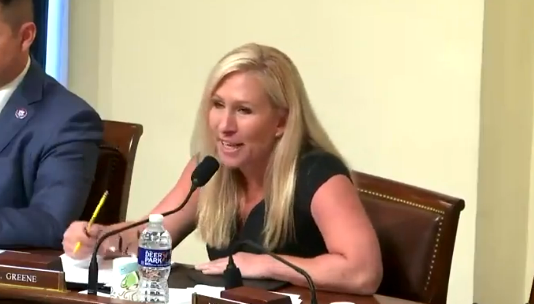
"He’s serving Ukraine first and America last, and that would be the worst thing to do," said Greene. "I can’t think of a worse betrayal ever to happen in United States history. And here’s what’s really ironic: the constitutional attorney, Mike Johnson, is literally betraying the American people in order to keep his grip of power on the Speakership."
https://ift.tt/1XZKycl
from ZeroHedge News https://ift.tt/1XZKycl
via IFTTT